LED display products are usually easy to use, but they still need basic care. Good maintenance habits can keep the screen clear, reduce connection problems, protect the battery, and extend the product’s working life. This is especially important for portable products, vehicle displays, outdoor signs, and items that are used by many people at events.
Start with regular cleaning. Dust, fingerprints, oil, and dirt can make the screen look dim or uneven. Use a soft dry cloth for daily cleaning. If the surface needs deeper cleaning, use a slightly damp cloth and wipe gently. Do not spray liquid directly onto the display, charging port, cable connector, or control area. Strong chemicals, alcohol-heavy cleaners, and rough cloth may damage the surface or printed parts.
Check the power connection often. For USB-powered or DC-powered displays, loose cables can cause flickering, unstable brightness, or sudden shutdown. Make sure connectors are inserted fully and cables are not sharply bent. If the product is used in a vehicle, check whether vibration has loosened the cable after several trips. If the cable is damaged, replace it with the recommended type instead of using an unknown cable.
Battery care is important for LED backpacks, wearable displays, portable signs, and event products. Use the recommended charging cable and adapter. Avoid charging in very hot, wet, or dusty places. Do not leave the battery fully discharged for a long time. If the product will not be used for several weeks, charge it partly before storage and keep it in a dry location.
Protect the product from heavy impact. LED panels, control boards, batteries, and cables can be damaged if the product is dropped, squeezed, or bent beyond its design range. Flexible LED products can bend, but they still have limits. Repeated sharp bending may damage the circuit or reduce display quality. For shipping or storage, use protective packaging and avoid placing heavy objects on the screen.
For outdoor or vehicle use, check waterproof protection before each use. A product described as water-resistant may handle light rain or splashes, but it may not be suitable for soaking, heavy rain, or pressure washing. Charging ports, cable covers, and seams should be closed properly. If the product becomes wet, turn it off and let it dry before charging.
Content updates should be done carefully. If the display uses an app or computer software, follow the supplier’s instructions. Do not disconnect power during content transfer unless the manual says it is safe. If an upload fails, restart the app and display before trying again. For teams using several displays, keep a record of app versions, content files, and device names to avoid confusion.
Storage conditions also affect product life. Keep LED display products away from high heat, direct sunlight for long periods, heavy moisture, and dusty environments. For backpacks or wearable products, empty the bag before storage and avoid folding or pressing the display area. For displays with brackets or suction cups, store accessories together so they are not lost.
If a display shows abnormal flickering, unusual heat, charging problems, or a burned smell, stop using it and contact the supplier. Continuing to use a damaged electronic product may make the problem worse. Most issues can be reduced with careful charging, cleaning, storage, and installation.
For businesses that use many LED display products, maintenance should be assigned to a specific person or team. A simple log can record charging issues, damaged cables, failed mounts, or products that need replacement. This is especially useful for exhibitions, rental use, delivery fleets, and retail stores where the same products are handled by different people.
It is also a good idea to keep spare accessories. Extra charging cables, mounting parts, adapters, and packaging materials can prevent downtime when a small part is lost or damaged. For imported orders, ask the supplier which accessories are easy to replace locally and which should be ordered together with the products.
For products used in public-facing campaigns, appearance should be checked before every event. A dirty screen, weak battery, loose mount, or outdated message can make the whole setup look unprofessional. A five-minute check before use is often enough to catch these issues.
If the product is loaned to different departments or event teams, attach a small label or card with charging and care notes. This helps people use the display correctly even when the original buyer is not present.
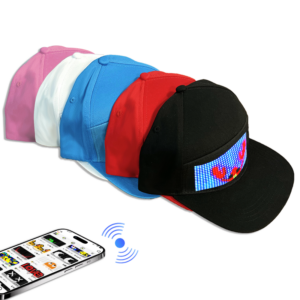
Step into a new era of headgear with the LED Baseball Cap, where style meets innovation in an unprecedented way. This cutting-edge accessory seamlessly integrates advanced LED technology with classic design, offering unparalleled customization ...
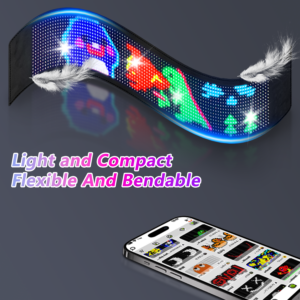
Step into the future of automotive innovation with the LED Flexible Car Display, a revolutionary addition to modern driving aesthetics. Designed to adhere seamlessly to your rear and side windows, this cutting-edge display transforms your vehic...
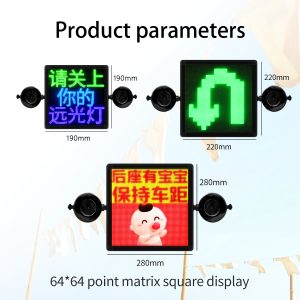
Car LED message displays are used for advertising, warning messages, delivery services, ride-share vehicles, fleet branding, and personal decoration. They are useful because the message can be changed without replacing a printed sign. Still, inst...
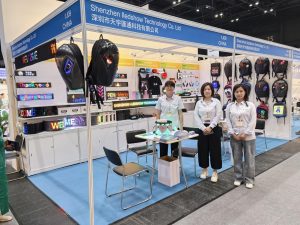
Global Sources Hong Kong Show is an important exhibition for consumer electronics, mobile accessories, smart products, gifts, and creative technology products. Shenzhen iLedShow Technology Co., Ltd. joined the show to introduce portable and custo...
 iledshow